


Solo: Your Gig Business App
4.21.16K Reviews
App Specs
- Version
- 6.0.5
- Updated On
- License
- Free
- Downloads
- 500,000+
- Developer
- WorkSolo
- Categories
- Business
- Platform
- Android, iOS
Screenshots

 Analysis by AppCompare
My week as a gig worker usually starts with a familiar problem: work is spread across different platforms, and the details I need to make a sensible plan are scattered with it. Solo: Your Gig Business App is built for that kind of juggling. It is a free business app from WorkSolo, aimed at people who want a clearer view of their independent work rather than another place to browse gigs. I would consider it most useful when more than one income stream needs attention.
Before you connect your work
The first practical question is whether you actually need a single view. If one platform supplies nearly all your income and already gives you useful records, adding another app may not change much. Solo makes more sense when you switch between rideshare, delivery, and freelance work, or when you want to look at your working week as a whole instead of platform by platform.
That distinction matters because an organizer is only valuable if it reduces decisions, not just moves information around. I would start by deciding what I want to learn: which work is paying best, whether expenses are eating into a good-looking total, or which days deserve more of my time. That gives the app a job to do and makes its dashboard easier to judge.
A useful routine for a mixed-work week
Picture a worker who delivers meals on busy evenings and takes freelance jobs during quieter daytime hours. Before opening Solo, they might check each service separately and rely on memory to compare the results. With connected gig accounts, the app can bring earnings together, making it easier to see the contribution from each line of work and notice a total that looks out of place.
I would use that combined view as a starting point, not as a reason to stop checking the original platform records. If a payment looks surprising, comparing it with the source is a sensible habit. The advantage is that a discrepancy becomes easier to spot when the week is presented together; the trade-off is that a summary still needs a worker’s attention before it informs a decision.
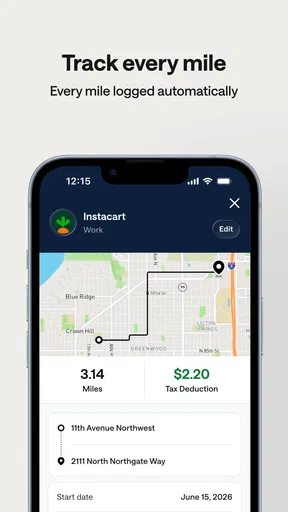
The next step is to add the costs that make a busy week less profitable than it appears. Mileage, receipts, and categorized expenses help turn gross earnings into a more useful picture. A small but useful habit is to record costs close to when they happen, rather than trying to reconstruct them later from memory. It is particularly relevant for workers who move between jobs and locations, where a week’s driving can blur together quickly.
Turning the overview into a plan
Once income and expenses are in view, Solo’s forecasts and scheduling suggestions can help shape the next week. I would treat them as prompts for testing, not instructions. A past pattern may point to a promising time to work, but a worker still has to weigh energy, family plans, travel, and the chance that demand will differ this time.
Worth Reading Before You Choose

EA SPORTS FC Mobile 26 Is a Bigger Football Game, but It Takes Time

Flipboard Shows What News Apps Must Do Beyond the Feed

Switching to Android Auto Means Rethinking Your Driving Routine

Google Calendar Makes a Crowded Week Easier to Manage

Ludo King Makes the Most of the Minutes Between Plans

Baby Panda World Brings Quick Play to Modern Phones, but Its Game Library Feels Busy
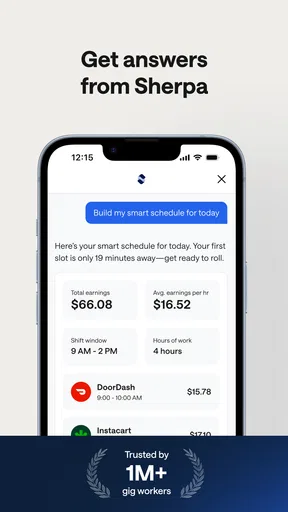
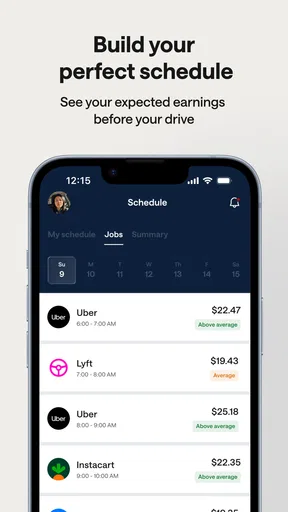
A practical experiment is to compare a suggested work window with your own results over several shifts, while keeping other conditions in mind. If a slot repeatedly feels worthwhile, it may deserve a place in your routine; if it conflicts with higher-value freelance work or leaves you exhausted, the suggestion is not a good fit. This is where the app’s overview can help, but personal judgment remains essential.
Your Gig Work, Organized
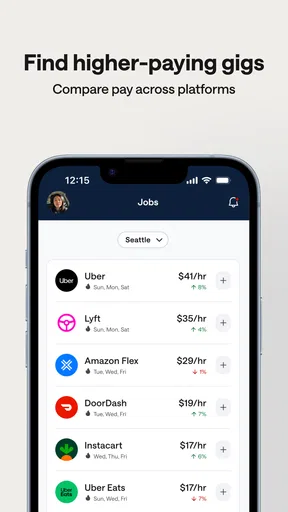
The first thing that struck me about Solo is how it seamlessly integrates all your gig work in one place. It’s like having a personal assistant who knows exactly what you need. You can link multiple gig accounts, and it’ll keep track of your earnings, expenses, and even suggest ways to optimize your time. I found it super helpful to have everything in one app, rather than juggling between different platforms.
Smart Income Tracking
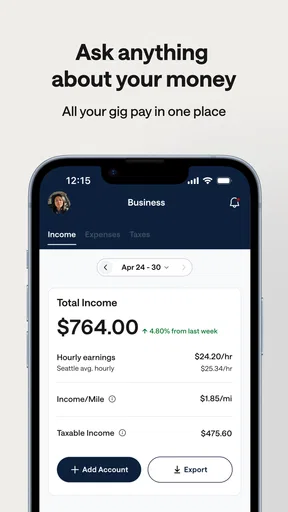
One of the standout features is the income tracking. Solo automatically logs your earnings from various gigs and provides a detailed breakdown. This helps in visualizing where your income is coming from and spots any discrepancies quickly. It also forecasts potential earnings based on your past work, which is a neat feature if you’re trying to plan your weeks ahead.
Expense Management Simplified
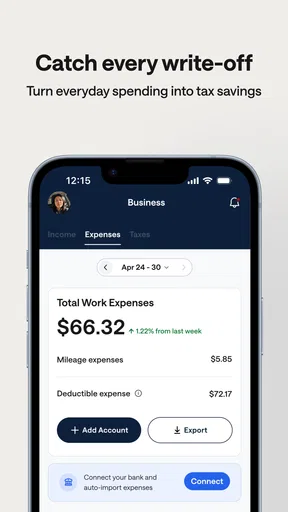
Managing expenses can be a real headache, but Solo simplifies this process. You can easily log your mileage, track receipts, and categorize your expenses. The app even gives tips on tax deductions specific to gig workers, which is a lifesaver come tax season. I found this particularly useful, as it took a lot of the guesswork out of my financial planning.
Optimize Your Schedule
Another cool aspect of Solo is its scheduling feature. It analyzes your work patterns and suggests optimal times to work based on high-demand periods. This means you can maximize your earnings without burning yourself out. I tried following its suggestions and noticed a slight uptick in my average hourly rate, which was a pleasant surprise.
How it fits beside your other tools
Solo’s role is different from that of an individual gig platform: the platform is where you accept and complete work, while Solo is intended to help you look across work sources and organize the business side. It also differs from a general spreadsheet. A spreadsheet can be tailored to almost any workflow, but it takes ongoing manual entry and maintenance; Solo’s connected-account approach is more convenient when it fits your services, while a spreadsheet gives you more control over exactly how information is arranged.
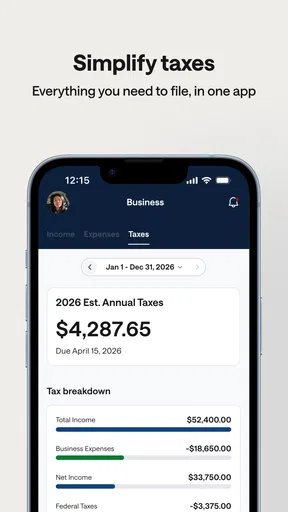
For taxes, I would treat its expense categories and deduction tips as useful preparation, not as a substitute for checking local rules or getting professional advice when your situation is complicated. A worker with multiple income sources, unusual expenses, or a need for formal bookkeeping may still want a dedicated accounting tool. The practical choice is not necessarily one app or the other: Solo can help organize gig activity, while a specialist tool may be better for deeper accounting tasks.
Handoffs, checks, and small points of friction
There are a few handoffs to keep in mind. You connect work accounts, review the combined picture, record costs, then use the result to decide what to do next. Each step depends on keeping the underlying information useful. If you forget expenses for weeks, the overview will be less helpful; if you rely on an estimate without checking your actual results, a forecast can create confidence that the week has not earned.
I would also decide in advance how much of my work I want to manage in one place. Someone who values a strict separation between services may prefer to keep using each platform’s own records and enter only selected expenses into a separate bookkeeping system. Solo’s appeal is consolidation, so that same approach may feel like extra administration to a person who has just one simple income stream.
Who is likely to get the most from it?
I see the strongest fit for a worker who combines several kinds of gig work and wants to make decisions from a broader view: whether to take another delivery shift, protect time for freelance assignments, or review costs before planning the next week. It can also help someone new to independent work build a habit of looking at earnings and expenses together instead of treating every payout as spendable income.
It is less compelling for someone who rarely works across platforms, already has a dependable accounting routine, or needs detailed business reporting beyond a gig-work overview. Before committing to a new routine, I would check that the services I rely on can be connected and decide whether I am comfortable keeping these records together. Those are more useful questions than assuming that one dashboard will automatically make work more profitable.
Interface, support, and what to check first
When it comes to navigating the app, Solo offers a clean and intuitive interface. Everything is laid out logically, and I didn’t find myself lost even once. The dashboard is particularly user-friendly, showing all vital information at a glance. Plus, the app’s design is sleek and modern, which makes it a joy to use.
It runs on Android from version 8.0, and its current version is 5.3.1. The app is rated for Everyone, while its optional in-app purchases range from $0.99 to $200.00 per item, so I would check the purchase details in the app before paying for anything. It has a 4.3 average from around 7,100 ratings, with over 500,000 installs. Those numbers suggest that it has found an audience, but they do not tell me whether its connected services and workflow suit my particular mix of work.
Community and Support
Solo also has a community feature where you can connect with other gig workers, share experiences, and get advice. The support team is pretty responsive, too. Whenever I had a question, they were quick to respond and very helpful. It’s nice knowing there’s a team backing you up, especially if you’re new to the gig world.
The app first appeared on December 1, 2021, and its continued development is reflected in the current 5.3.1 release. In practical terms, I would still make the first session a check-up: connect the accounts I actually use, inspect whether their earnings appear as expected, and enter a recent expense to see whether the record is understandable. Doing that before depending on the overview for a weekly decision is a low-effort way to find out whether the workflow suits me.
Where the workflow can break
Solo is most useful when its overview leads to a decision, but it cannot remove the uncertainty built into gig work. Demand changes, a good past time slot may not repeat, and a forecast is not a guaranteed income. The app can help me compare and plan; it cannot decide whether a shift is worth the time, travel, or fatigue involved.
There is also a difference between keeping expenses organized and completing every part of a tax or bookkeeping process. I would keep supporting receipts and check the rules that apply to my circumstances rather than treating an in-app tip as a final answer. If a user needs a formal accounting trail or more advanced financial controls, a dedicated service may be the better main tool.
After the setup and regular record-keeping, the useful outcome is not a perfect forecast; it is a clearer basis for choosing where to spend the next block of working time. If the combined view helps me spot a weak shift, keep costs from disappearing into memory, or protect a better-paying commitment, the routine has earned its place. If it adds effort without changing any decisions, I would keep the simpler tools I already trust.
My take on the finished routine
Overall, Solo: Your Gig Business App is a fantastic tool for anyone entrenched in the gig economy. It provides all the essential features one could ask for, like income tracking, expense management, and scheduling optimization, wrapped in a user-friendly package. Whether you’re a seasoned gig worker or just starting out, this app is definitely worth checking out. It’s like having a business manager right in your pocket, and who wouldn’t want that?
If you're ready to take control of your gig work, give Solo a try. You might find it’s exactly what you’ve been looking for to streamline your hustle.
My recommendation is to try it with a narrow purpose first: use the combined earnings view to compare work sources, then see whether recording costs changes the way you plan your next week. That gives the app a fair test without turning setup into another project. If the routine helps you make clearer choices, Solo can be a useful companion for managing independent work; if not, there is no need to replace a straightforward system that already works for you.
Pros
- Intuitive interface for easy navigation.
- Comprehensive tools for gig management.
- Real-time notifications for updates.
- Customizable invoicing options.
- Secure payment integrations.
Cons
- Limited offline functionality.
- Occasional sync issues.
- Requires frequent updates.
- No dark mode option.
- Some features are subscription-based.
FAQs for Solo: Your Gig Business App
What features does Solo: Your Gig Business App offer to help manage my gig work?
Solo: Your Gig Business App provides a comprehensive suite of tools to streamline gig work management. It includes features like income tracking, tax estimation, mileage logging, and automated scheduling. The app also offers personalized insights and tips to help maximize your earnings and optimize your gig schedule.
Is Solo: Your Gig Business App compatible with both Android and iOS devices?
Yes, Solo: Your Gig Business App is available for download on both Android and iOS platforms. The app is designed to work seamlessly across different devices, ensuring that you can manage your gigs efficiently whether you're using a smartphone or a tablet.
Does Solo: Your Gig Business App offer any customer support for troubleshooting issues?
Absolutely, Solo: Your Gig Business App provides robust customer support to assist with any issues or queries. Users can access support through in-app chat, email, or a dedicated support hotline. The app also features a detailed FAQ section and user guides to help resolve common problems quickly.
How does Solo handle data security and user privacy?
Solo: Your Gig Business App prioritizes user privacy and data security. The app employs advanced encryption protocols to protect your information. Additionally, Solo adheres to strict privacy policies, ensuring that your data is never shared with third parties without your consent. Regular updates also enhance security measures.
Are there any subscription fees or in-app purchases in Solo: Your Gig Business App?
Solo: Your Gig Business App offers both free and premium subscription models. The free version provides basic functionalities, while the premium version unlocks advanced features, such as detailed analytics and personalized coaching. Users can choose a monthly or annual subscription plan, with no hidden fees involved.


